
Markdown to Html
Paste Markdown and get clean, standards-based HTML as you type, with a live preview. It supports headings, emphasis, links, images, lists, blockquotes, code blocks, horizontal rules and GitHub-style tables — and it runs entirely in your browser.
- Free to use
- No sign-up
- Runs in your browser
Convert Markdown to HTML
Markdown Cheat Sheet & Style Guide
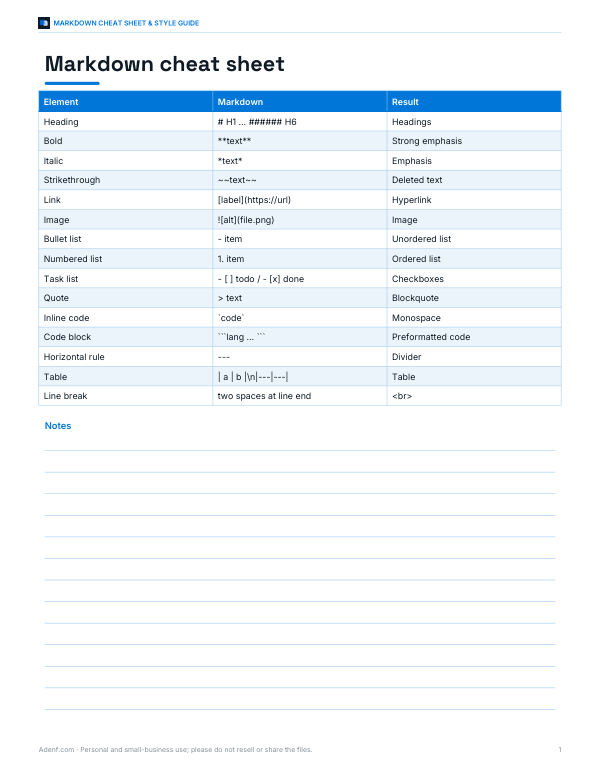
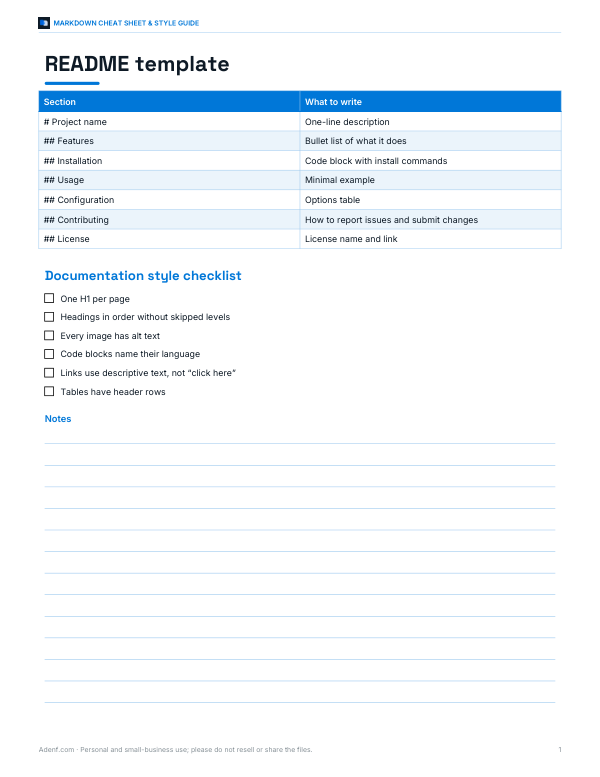
A printable Markdown cheat sheet, a documentation style guide and README templates for your projects.
- Markdown cheat sheet (PDF, DOCX)
- README & docs templates (DOCX, PDF)
Formats: PDF, DOCX. Instant download after payment (link valid 72 hours, up to 5 downloads). AI-assisted: the templates were drafted with AI help and reviewed and laid out before publishing.
$5.00 USD, one-time
- Instant download
- 7-day refund
- Secure checkout by Stripe
7-day money-back guarantee. Full refund within 7 days of purchase, even after you download.
Full refund within 7 days — see the refund policy and license.
Free printables
Single sheets you can print right now, no sign-up. The full pack adds every sheet in one download plus the editable files.
What Markdown is and why convert it
Markdown is a lightweight way to write formatted text using plain characters: # for headings, asterisks for emphasis, hyphens for lists. It was created by John Gruber in 2004 so that writing for the web could be as readable as an email, and today it is used in README files, documentation, note-taking apps, forums and static site generators. Browsers do not display Markdown directly, so to publish it on a web page, in an email template or in a CMS that expects HTML, you convert it. This tool does that instantly and shows the result beside your text.
Supported Markdown syntax
| You type | HTML produced |
|---|---|
# Heading to ###### Heading | <h1> to <h6> with an id for anchor links |
**bold**, *italic*, ~~strike~~ | <strong>, <em>, <del> |
[text](https://url) | <a href> link; bare URLs are linked too |
 | <img> with alt text |
- item or 1. item, indented for nesting | <ul> / <ol> lists; - [ ] task items |
> quote | <blockquote> |
Backticks and fenced ``` blocks | <code> and <pre><code> with a language class |
--- on its own line | <hr> |
Pipe tables with a |---| divider | <table> with column alignment |
The converter follows the common CommonMark and GitHub Flavored Markdown conventions for these elements. Rare edge cases, such as reference-style links, footnotes or HTML blocks spanning several paragraphs, are not supported; for those, a full Markdown library is the right tool.
Line breaks and paragraphs
In standard Markdown, a single line break inside a paragraph is treated as a space, and a blank line starts a new paragraph. That surprises people who paste text from chat apps or emails. If your text relies on single line breaks — addresses, poems, song credits — choose “Treat single newlines as <br>”. To force a line break in standard mode, many editors let you end a line with two spaces or a backslash.
Security: raw HTML and the preview
Markdown allows raw HTML, but pasting HTML you did not write into a web page can be dangerous: it may contain scripts or event handlers. By default this converter escapes any HTML in your Markdown, so it appears as text. If you choose to keep raw HTML, the output contains it as written, and the preview removes scripts, iframes and inline event handlers before displaying it. Links are restricted to web, email and relative addresses, so a javascript: link becomes a harmless #. If you publish user-supplied Markdown on a website, sanitise the resulting HTML on the server as well.
Worked example
The sample text converts a heading to <h1 id="project-notes">, the second heading to an <h2>, a nested bullet list to <ul> elements inside a list item, the numbered list to <ol>, the quote to a blockquote, and the table to a <table> whose second column is centred and third column right-aligned because of the colons in the divider row. The fenced code block becomes <pre><code class="language-js">, ready for a syntax highlighter.
Using the HTML
- Blog or CMS: paste the fragment into the HTML or code view of WordPress, Ghost, Shopify pages or similar editors.
- Email: paste into an email template editor; add inline styles if your email client strips stylesheets.
- Documentation: choose “Full HTML document” to get a standalone .html file you can open in any browser.
- Styling: the output contains semantic tags without classes (except the code language), so your site's own CSS styles it.
Markdown flavours and compatibility
Markdown has several dialects. The original 2004 description left some behaviour ambiguous, so CommonMark was created as a precise specification, and GitHub Flavored Markdown (GFM) adds tables, task lists, strikethrough and automatic links on top of it. Platforms such as Reddit, Discord, Slack, Notion and many static site generators each support slightly different subsets. This converter aims at the common core that behaves the same almost everywhere, plus GFM tables and task lists. If a document renders differently on another platform, check nested lists and emphasis next to punctuation first — those are where dialects most often disagree.
Privacy
The conversion happens in JavaScript on your device. Your text is not uploaded, stored or logged. Opening a .md file reads it locally in the browser.
Markdown tips for cleaner HTML
- Put a blank line before and after lists, tables, quotes and code blocks so they are recognised reliably.
- Use one heading level for each level of structure, without skipping from
#to###— it helps accessibility and search engines. - Always write alt text for images:
. - Indent nested list items by two or more spaces consistently.
- Name the language after the opening fence of a code block so highlighters colour it correctly.
Frequently asked questions
Does it support GitHub Flavored Markdown tables?
Yes, pipe tables with a divider row, including left, centre and right alignment with colons.
Is my Markdown sent to a server?
No. Everything runs in your browser.
Why did my HTML tags appear as text?
Raw HTML is escaped by default for safety. Choose “Keep it” if you trust the content.
Can I get a complete HTML page?
Yes, choose “Full HTML document” to wrap the output in a basic HTML page.
Does it support footnotes or reference links?
Not currently. Inline links and images are supported.
Can I convert HTML back to Markdown?
Not with this tool. Converting HTML to Markdown needs a different parser because HTML can express layouts that Markdown cannot.
Will the output validate?
The generated elements are standard HTML5. Validation of the full page also depends on the template you paste it into.